
YEP Casino Log In & Start Playing
If you are ready to jump in and spin for real prizes, logging in at YEP Casino takes less than a minute, and you can do it from any device you like.
Your Gateway to YEP Casino
Once you have your YEP Casino account set up, you unlock more than 6,000 games, tournaments, promotions, and our VIP Club in a couple of clicks. You can switch between desktop, mobile browser, and app without creating separate accounts; you just use the same email or phone and password everywhere.
Now, every new player who joins YEP Casino sees the big “Register and get up to €3,000 + 300 FS” banner, so you know from the first second what kind of welcome package you are walking into. You can also use Google social login if you hate filling in forms and want to get to the lobby even faster.
What you unlock with a YEP Casino login:
- Full access to slots, live casino, jackpots, and instant games with more than 6,000 titles available.
- Promotions like weekly cashback up to 12 percent, weekly bonus up to €1,000, and Highroller Bonus up to €5,000.
- VIP Club with levels, points, cashbacks, and bonus multipliers that grow as you play.
- In‑profile tools at YEP Casino include limits, KYC verification, payment history, and bonus management in one place.
Bottom line, your login is your personal key to everything YEP Casino offers, from welcome bonuses to tournaments and loyalty rewards in a single wallet.
How to Create a YEP Casino Account
Let us dig into the registration, because creating a YEP Casino account is a simple two-step flow that starts on the big “Register” button in the YEP Casino site header. You can see it next to the “Login” button on desktop and in the main menu on mobile.
You start on the registration page that clearly shows the welcome bonus up to €3,000 plus 300 free spins, plus the form where you enter basic details and can optionally tick boxes to receive promotions by email and SMS. After that, you confirm your email or phone, complete your profile, and you are ready to deposit and play.
Step 1 — Email & Password
In step one, you choose whether to sign up to YEPCasino by email or phone, and set your login credentials. The form clearly labels “Email”, “Phone”, “Password”, and “Currency”, plus a “Have a promo code” field if you want to drop a code right away.
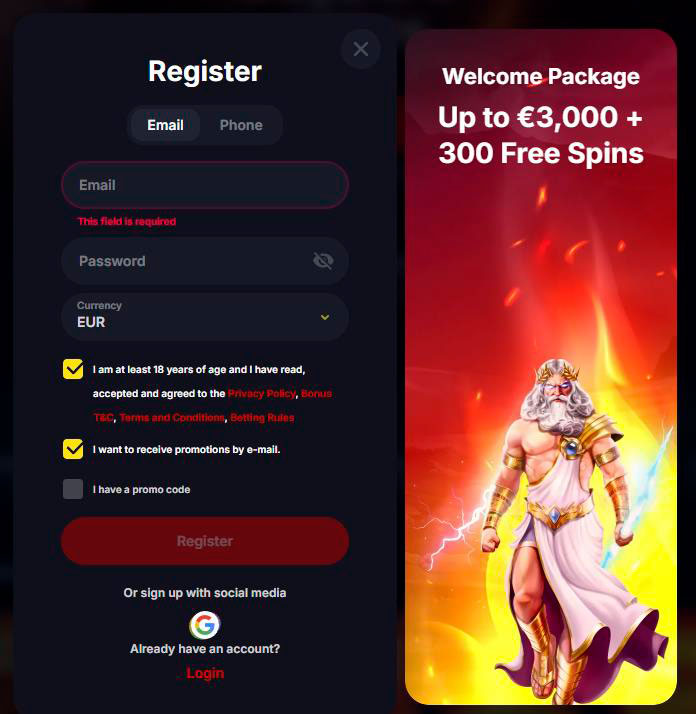
You will need to enter a valid email address, because the system will tell you “Please enter a valid email address” if the format is wrong and “This field is required” if you try to skip it. For the password, the on-screen hints tell you it must contain at least six characters, at least one letter, and at least one number, and special symbols are not allowed.
Quick checklist for Step 1:
- Type your email in the “Email” field or choose the “Phone” tab if you prefer signing up to YEPCasino by phone.
- Pick your account currency in the “Currency” dropdown before you move on.
- Create a password with a minimum of six characters that includes at least one letter and one number.
- Tick if you want to receive bonuses and news by email or SMS; this is optional but useful for promo hunters.
Honestly, once you hit “Next” here, the hardest part is done, and you are already halfway to your first spin at YEP Casino.
Step 2 — Email Confirmation
After the first step, YEP Casino immediately sends you a confirmation message, and you will see a prompt along the lines of “Please confirm your e‑mail”. This is important because confirming your email unlocks access to bonuses, notifications about new games and tournaments, and payment confirmations.
If you miss the email, there is a “Send again” or “Resend” link and a little tip that says “Haven’t received an email within 5 minutes?” so you can easily trigger another message. Once you open the mail and click the link, you will also see a “Successfully!” message on the site, and you can go back to browsing games.
What email confirmation gives you:
- Ability to claim and receive casino bonuses that require a confirmed contact address.
- Notifications about new slots, tournaments, and special promotions straight to your inbox.
- Automatic emails about deposits, withdrawals, and other important account events.
Bottom line, if you want the full promo experience at YEP Casino, confirming your email is not optional; it is your fast track to the good stuff.
Step 3 — Complete Your Profile
Now that your email is confirmed, you will be asked to provide a few more personal details inside your profile to fully activate the account. This includes your first name, last name, address, city, country of residence, phone number, and date of birth, all entered via clear fields.
You will see fields like “First Name”, “Last Name”, “Address”, “City”, “Country of residence”, “Phone number”, and “Date of birth” along with a “Save changes” button. YEP Casino also shows messages like “Profile updated successfully” when everything is filled in correctly, so you know your data is stored.
Profile details you need:
- Personal data: first name, last name, date of birth, and gender for YEP Casino verification and age checks.
- Contact details: full residential address, city, and country of residence.
- Phone number with country code that passes the phone mask and validation checks.
- Optional preferences like language and marketing consents that you can adjust at any time.
Once your profile is complete, you can go straight to deposits, claim your welcome package, and start exploring all game categories at YEP Casino.
Logging In to YEP Casino
Now that your account is ready, logging back in is super fast and always happens via the “Login” button in the header or menu. The good news is you can sign in using either email or phone, and you always have the “Forgot password?” option if you need a reset.
When you click “Login”, a modal pops up with two tabs, “Email” and “Phone”, plus the input fields and a big login button, so you never have to guess where to click. Below the form, there is also an option to log in with social media, currently Google, for those of you who prefer one-click entry.
Login on Desktop
On desktop, you will find the “Login” button in the top right corner of the YEP Casino site header next to “Register”. Clicking it opens the login modal in the center of the screen with fields for “Email” or “Phone” and “Password”, plus the link to reset your password.
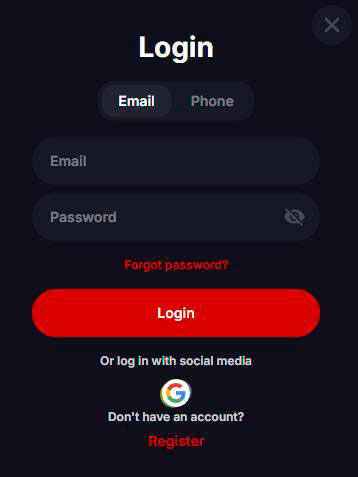
If you enter wrong credentials, the system tells you “Wrong credentials,” so you know to double-check your data. Once you are logged in to YEP Casino, your header changes to show “My account”, balances, bonuses, and profile options instead of the login button.
Desktop login steps at YEPCasino:
- Click “Login” in the header on the main YEP Casino page.
- Choose the “Email” or “Phone” tab in the login modal, depending on how you registered at YEP Casino.
- Enter your email or phone number and your password, then hit “Login”.
- If needed, use “Forgot password?” to start password recovery.
Bottom line, logging in on a desktop takes just a couple of seconds and drops you directly back into the lobby with all your balances visible.
Login via Mobile Browser or App
On a mobile browser, the flow is almost identical; the only difference is that the “Login” option lives inside the burger menu and sometimes directly in the header, depending on screen size. Tapping it slides up the same YEPCasino login form with email or phone tabs and a big login button that is easy to hit with your thumb.
YEP Casino also promotes its installable application and shows “Download the App” and QR options, so you can quickly install and then log in through the app with the same details. Your session can expire if you stay idle for a long time, and you will see a message like “Your session has been terminated due to the absence of gaming activity… Please log in again.” This is normal behaviour.
Mobile login options at YEPCasino:
- Log in through a mobile browser with the same header button and modal you see on desktop, just adapted for touch.
- Install the app via the “Download the App” widget or QR code and then log in there with the same account.
- Use social login (Google) on mobile as well if you prefer not to type your email and password.
Whether you use a mobile browser or app, you are always using a single YEP Casino account, so your balances, bonuses, and bets stay in sync.
Account Security & Credentials
Your login details are the only key to your real money balance, so at YEP Casino, we treat password rules, limits, and blocking very seriously. The interface is built to guide you into creating strong passwords, and there are clear error messages when something looks risky or incorrect.
Inside your profile settings, you can change your password, confirm your phone, set limits, and see messages about blocked login attempts or account limits. If something looks off, like too many failed login attempts, the system will temporarily block access and ask you to try again later or contact support.
Password Rules & Recovery
When you create or change your password, YEP Casino shows you a few simple rules: it must include at least one letter, at least one number, and be at least six characters long. If the password does not meet the rules, you will see hints like “Should contain a letter”, “Should contain a number”, and “Password should contain at least 6 characters”.
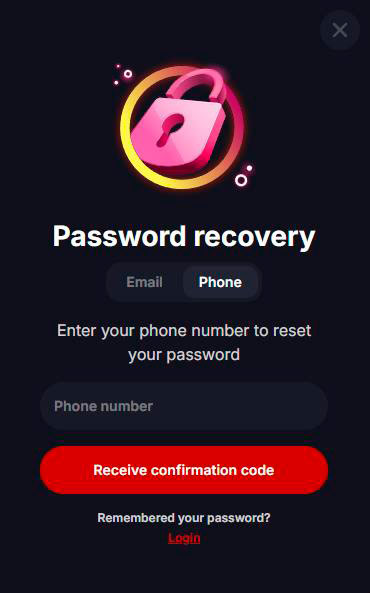
To reset your password, you click “Forgot password?” in the login modal and then choose whether you want to reset via email or phone. You will see texts like “Password recovery” and “Please enter your email below to reset your password” or “Enter your phone number to reset your password”, and then you receive either a link by email or a code by SMS.
Password and recovery quick facts:
- Minimum length 6 characters, must include at least one letter and one number.
- Special symbols are not allowed when changing a password, according to the on-screen notice.
- The recovery link can be sent to your email, and the recovery code can be sent to your phone number.
- After a successful reset, you will see messages like “Password has been changed” and “Password recovery link has been sent to your email”.
Honestly, as long as you remember your email or phone number and have access to it, getting back into your YEP Casino account is very straightforward.
Account Blocking & Reactivation
Another standout protection feature is that YEP Casino can temporarily block your ability to log in if there are too many failed attempts or suspicious activity. In that situation, you might see pop-up texts like “The account has been temporarily blocked due to failed login attempts. Try again in a few minutes” or “Your ability to log in is blocked. Please contact support”.
There are also responsible gaming limits that can block certain actions like depositing or playing, if you hit your own limits. For example, you can see messages like “The ability to make transactions is blocked”, “Deposit limit reached”, “Loss limit is over”, or “Activity limit you have set has already been reached”.
When your account can be restricted:
- Too many wrong login attempts lead to a temporary block on login.
- Reaching self-imposed limits like deposit, loss, wager, or activity limits for the day.
- Region restrictions where playing or registration from your country is not allowed.
- KYC or risk checks that require you to upload documents before continuing to play.
If your login is blocked longer than a few minutes, the best move is to hit our live chat or support; we will guide you through reactivation or the next steps.
KYC Verification
Let us talk about KYC for a second, because this is the step that makes sure you are you and keeps payouts and bonuses safe for everyone. Inside your profile menu, there is a “KYC Verification” section where you can upload documents and track status.
YEP Casino lists the exact document types we can accept, along with clear descriptions of what each file should show. You will see options like “Passport”, “National ID Card”, “Driving Licence”, “Bank statement”, “Utility bill”, “Phone bill”, “Bank Transfer”, “Debit/Credit Card”, “E‑Wallet”, and “Source of wealth”.
| Document type | Sides needed | What it must show |
| Passport | First two pages | Full name, photo, date of birth, and document number. |
| National ID Card | Front and back | Full name, photo, ID number, and expiry date. |
| Driving Licence | Front and back | Full name, photo, address if printed, and licence number. |
| Utility/Phone bill | One page | Full name and full residential address. |
| Bank statement | One page or more | Full name, address, and account number for banking verification. |
You can either upload files from your library or take photos directly from your device using buttons like “Take a photo” or “Upload from library”. There is even a specific “Selfie with ID” option where you take a picture of yourself holding your document together so our team can verify that both match.
KYC tips so you pass the first time:
- Make sure all corners of your document are visible and nothing is cut off or blurry.
- Check that your name and address on bills or statements match the details in your profile.
- Always upload both front and back when the document type description specifically mentions it.
- For “Source of wealth”, pick a strong document like a salary bank statement if requested.
Once KYC is approved, you can enjoy smoother withdrawals and fewer interruptions, since your account is fully verified in the YEP Casino system.

FAQ
Registration at YEP Casino literally “only takes a minute” as the hero banner says, because step one is just email, password, and currency. You might spend a bit more time on profile completion and KYC, but the basic sign-up is super quick.
You can usually browse and try demos, but to enjoy bonuses and get payment confirmations, YEP Casino clearly asks you to “Please confirm your e‑mail”. Confirmed email also unlocks notifications about new games and tournaments, so you do not miss promos.
Yes, both the login modal and password recovery screens support phone-based access with “Phone” tabs and SMS recovery codes. Just make sure your phone number is entered with the correct country code and format; you will see errors like “Please enter a valid phone number”.
You click “Forgot password?” then follow the short “Password recovery” flow using either your email or phone. After you enter the code or click the link, you can set a new password that follows the usual character rules and get a “Password has been changed” confirmation.
If you see messages about your ability to log in being blocked or the account being temporarily blocked, it is usually due to too many failed password attempts or limits you have set. In that case, you can either wait a few minutes and try again, or reach out to support or live chat so we can check your account status from the YEP Casino side.